
모두
FlightFeeder Antenna Replacement
Due to a defective batch of antennas shipped in late 2014 and 2015, it is necessary that you replace your antenna for optimal operation of your FlightFeeder.
| 1FlightFeeder Antenna Kit |
Verify antenna replacement kit contents
 |
The filter is designed to optimize the ADS-B signal that the FlightFeeder receives.
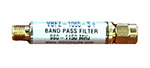 |
| 2안테나 설치하기 |
- 외부 안테나는 가능한 한 높고 항공기에서 오는 신호를 차단할 수있는 장애물을 피하여 최적의 위치에 설치해야 합니다. 장애물에는 다른 건물, 나무 및 고지대가 포함될 수 있습니다. 야외에서 안테나를 설치하는 동안 FlightFeeder 자체는 실내에 있어야 합니다.
- 아래 두 개의 화살표로 표시된 대로 두 개의 와셔를 단단히 조입니다.
- 위쪽 화살표로 표시된 너트를 단단히 조입니다.
- 네 개의 부착 지점 각각에 대해 이 작업을 반복하고 아래 사진과 같이 각 지점을 장착 막대기 직경에 맞게 조입니다.
- 장착 막대기 위로 미끄러지게 밀어 안테나를 장착하십시오.
- 동축 케이블은 두껍고 신호 손실을 방지하려면 케이블이 구불어 지지 않도록 해야 합니다.
- 동축 케이블을 안테나에 연결하고(아래 그림 참조) 다른 쪽 끝을 FlightFeeder에 연결합니다.


| 3Next Steps & More Information |
The coverage of your receiver should now be significantly improved. You can also view the receiver status through our ADS-B statistics portal.
We thank you for joining the FlightAware ADS-B network and remind you to contact us with any questions or comments.
